99% 的人都以为「随便问一句」就能让 AI 给出完美答案,结果不是答非所问,就是格式乱成一团。真正拉开差距的,不是你会不会用 AI,而是你会不会写提示词。只要把任务、背景、限制和输出说清楚,DeepSeek 的表现会像换了一个模型一样。
据不少团队反馈,同一个任务,用随口一问的提示词和用结构化提示词,产出质量差异能达到 2~3 倍,返工时间也明显减少。
一、DeepSeek 提示词与模板:到底在说什么?
1. 什么是 DeepSeek 提示词?
DeepSeek 提示词,就是你发给 DeepSeek 的那段输入,用来让它生成答案、草稿、分析、计划、代码、摘要,或者结构化结果。比如:
Write a blog post about email marketing.
这种一句话也能跑,但几乎没给任何方向。稍微结构化一点,会好很多:
Write a 1,200-word beginner-friendly blog post about email marketing for small business owners. Use a practical tone, include examples, add an H2 outline, and finish with a checklist.
第二个提示词,把任务、受众、语气、长度、结构和预期输出都说清楚了。DeepSeek 能处理简单指令,也能处理复杂工作,但答案质量通常和提示词的清晰度成正比。用 API 时,还会受是否开启 thinking 模式影响,目前文档说明:thinking 默认开启,可通过 thinking 参数切换。
2. 什么是 DeepSeek 提示词模板?
DeepSeek 提示词模板,是可以反复复用的一套「提示骨架」。你不用每次从零开始,只要把占位符换成当前任务信息就行。比如:
Act as a [ROLE]. Create a [CONTENT TYPE] about [TOPIC] for [AUDIENCE].
Use a [TONE] tone. Include [KEY POINTS]. Format the output as [FORMAT].
换成具体场景,就变成:
Act as a B2B SaaS copywriter. Create a landing page outline about AI customer support for startup founders.
Use a clear and persuasive tone. Include benefits, features, objections, and FAQs. Format the output as markdown.
模板的价值在于:省时间、减少含糊指令、让结果更稳定。尤其适合重复性流程,比如写博客、调试代码、做 SEO 规划、客服回复、商业分析、以及生成 JSON 结构等。
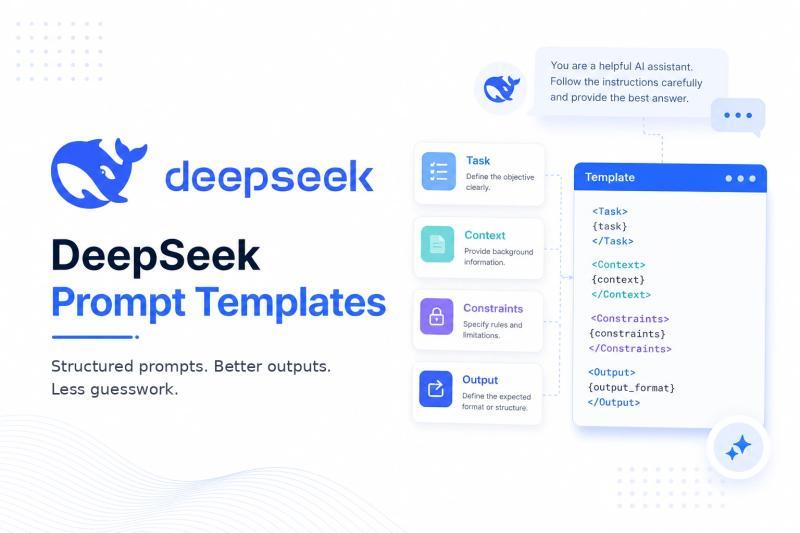
3. 通用 DeepSeek 提示词模板(可套用)
很多人卡在「不知道怎么开头」。可以直接用这个通用模板:
Task: [Describe exactly what you want DeepSeek to do]

Context: [Give background, audience, goal, data, or situation]

Constraints:
- [Constraint 1]
- [Constraint 2]
- [Constraint 3]

Output format:
[Specify table, bullet list, JSON, markdown, email, code, report, etc.]

Verification:
Before finalizing, check the answer for accuracy, missing details, and format compliance.
我自己在做内容和产品文档时,经常就用这套结构,稍微改几行就能复用。
二、T-C-C-O-V:写好提示词的一套万能公式
1. 从「糟糕提示」到「合格提示」
很多人给 AI 的指令只有四个字:
Make this better.
这种几乎等于没说。换成结构化版本,效果会完全不同:
Task: Improve the following product description.

Context: The product is a project management app for freelance designers. The audience is solo creatives who dislike complicated enterprise software.

Constraints:
- Keep it under 120 words.
- Use a friendly but professional tone.
- Avoid buzzwords.
- Focus on clarity, time savings, and client collaboration.

Output format:
Return the revised description, then list 3 reasons why it is stronger.

Text:
[PASTE TEXT]
这里已经隐含了一个公式:任务(Task)、背景(Context)、限制(Constraints)、输出格式(Output)、校验(Verification)。
2. 通用 T-C-C-O-V 模板
可以直接记成 T-C-C-O-V:
Task:
[What should DeepSeek do?]

Context:
[What does DeepSeek need to know?]

Constraints:
[Rules, limits, tone, length, exclusions, or requirements]

Output format:
[Exact structure you want]

Verification:
Check the final answer for accuracy, clarity, missing information, and compliance with the requested format.
有用户反馈,用这套结构重写提示词后,代码错误率和「答非所问」的情况明显下降,尤其是在多步骤任务里。
我也不太确定这个说法对不对,但从实际体验看,哪怕只加上 Context 和 Output format,质量就会有肉眼可见的提升。
三、DeepSeek 提示词实用技巧(真的有用的那种)
1. 任务要具体,不要「随便帮我写点」
「Write a sales email」这种太宽泛,换成:
- 「Write a 150-word cold email for B2B SaaS founders offering a free churn audit.」
就清晰很多。DeepSeek 不会自动知道你卖什么、给谁看、想达到什么目标,这些都要你说出来。尤其是商业场景,任务越具体,越接近可直接使用的成品。
2. 背景信息越清楚,越像「懂你的人」
DeepSeek 不会读心,它不知道你的品牌语气、行业规则、法律限制、甚至你团队的技术栈。你可以补充:
- 受众是谁、什么水平
- 你的目标是转化、曝光还是教育
- 有哪些不能说的(比如医疗、金融敏感表述)
- 现有素材或数据来源
有一位做跨境电商的朋友,把店铺类目、客单价、主要市场都写进 Context 后,AI 生成的文案几乎不用再大改,只做轻微本地化就能上架。
3. 输出格式要点名,不要「你看着办」
如果你想要:
- 表格:就写「Output format: table with columns A/B/C」
- JSON:写清「return valid json only」并给出结构
- Markdown:说明要 H2/H3、列表、代码块
- 步骤计划:要求「step-by-step plan」
很多人吐槽「AI 不听话」,其实是自己没把格式讲明白。数据显示,在提示词中明确指定格式,可以显著减少人工整理时间。
4. 复杂任务用分段标签,别一大坨
长提示词如果没有结构,AI 也容易「迷路」。可以用:
- Task:
- Context:
- Constraints:
- Output:
这样的标签,把不同信息分开。对你自己复用和排错也更友好。
5. 适度加限制,帮模型「收窄」答案空间
限制可以包括:
- 字数范围、阅读难度
- 语气(专业、友好、犀利等)
- 禁止内容(夸大承诺、敏感话题)
- 目标受众、使用场景
但也别互相矛盾,比如「写详细报告」又要求「控制在 300 字内」,这种会让模型无所适从。
6. 需要时让它自检,但别强求长推理
重要任务可以加一句:
- 「Before finalizing, check whether the answer follows all instructions.」
让 DeepSeek 做一次自查,找出遗漏和格式问题。风险点在于:如果你强行要求「详细展示全部推理过程」,既浪费 token,也可能暴露不必要的中间思路。更好的做法是要「简短理由、关键假设、风险提示」。
7. JSON 输出要按官方建议来
DeepSeek 的 JSON 输出指南建议:
- 在参数里设置
response_format: {"type": "json_object"} - 在提示词里明确写出「json」
- 提供一个示例 JSON 结构
- 合理设置
max_tokens,避免 JSON 被截断
如果你用在生产环境,建议先用小样本测试几轮,确认不会出现字段缺失或多余字段。
8. 不要在推理模型上「过度提示」
遇到需要复杂推理的任务,比如多步骤商业决策、技术架构设计,给清楚:
- 问题本身
- 关键约束
- 你想要的最终形式(结论 + 简要理由)
就够了。强行要求它输出超长的隐藏推理,只会增加噪音,还不利于你快速判断对错。
9. 参数设置要和场景匹配
DeepSeek 的温度建议大致是:
- 0.0:代码、数学等需要稳定答案的任务
- 1.0:数据清洗、数据分析
- 1.3:日常对话、翻译
- 1.5:创意写作、诗歌
在 thinking 模式下,temperature、top_p、presence_penalty、frequency_penalty 等参数不生效,这点很多开发者会忽略。
风险提醒:如果你把创意类任务温度设得太低,输出会非常「保守」;反过来,代码任务温度太高,错误率会明显上升。
四、40+ DeepSeek 高效提示词模板(可直接复制)
下面这些模板,你可以直接复制,用中括号里的占位符替换成自己的信息即可。
1. 通用效率类模板
1)每日优先级规划
适用场景: 安排忙碌的一天。
提示词:
Act as a productivity coach. Help me plan my day based on the tasks below.

Tasks:
[TASK LIST]

Context:
- My working hours: [WORKING HOURS]
- My energy pattern: [MORNING/AFTERNOON/EVENING]
- Important deadlines: [DEADLINES]

Output format:
Create a prioritized schedule with:
1. Top 3 priorities
2. Time blocks
3. Tasks to postpone
4. One risk to watch
可怎么改:
- 加上每个任务的预估时长
- 标明固定会议、通勤和休息时间
2)会议纪要与行动项
适用场景: 把会议记录变成可执行任务。
Summarize the meeting notes below.

Meeting notes:
[PASTE NOTES]

Output format:
- Executive summary
- Key decisions
- Action items with owner and deadline
- Open questions
- Follow-up email draft

Constraints:
Keep the summary clear, neutral, and practical.
可以补充参会人名单,或要求「更短/更详细」版本。
3)决策矩阵
适用场景: 在几个方案之间做选择。
Help me choose between these options: [OPTIONS].

Context:
[BACKGROUND]

Evaluation criteria:
[CRITERIA]

Output format:
Create a decision matrix with scores from 1 to 5 for each criterion.
Then recommend the best option and explain the trade-offs.
你可以加上权重、预算、风险、影响范围等信息。
2. 推理与问题分析模板
4)根因分析(5 Whys)
适用场景: 反复出现的问题排查。
Analyze the following problem and identify likely root causes.

Problem:
[DESCRIBE PROBLEM]

Context:
[BACKGROUND]

Output format:
- Problem restatement
- 5 Whys analysis
- Likely root causes
- Evidence needed
- Recommended next actions

Do not overstate certainty. Mark assumptions clearly.
可以补充数据、时间线、受影响用户等细节。
5)利弊权衡分析
适用场景: 复杂决策的取舍评估。
Evaluate the trade-offs of this decision:

Decision:
[DECISION]

Options:
[OPTIONS]

Context:
[CONTEXT]

Output format:
1. Benefits of each option
2. Risks of each option
3. Hidden costs
4. Reversibility
5. Recommendation
6. Conditions that would change the recommendation
可以要求「偏保守」或「偏激进」的建议。
6)假设检查器
适用场景: 在执行前检查方案是否站得住脚。
Review this plan and identify weak assumptions.

Plan:
[PASTE PLAN]

Output format:
- Key assumptions
- Risk level for each assumption
- How to validate each assumption
- What could go wrong
- Improved version of the plan
可以加上行业、预算、目标人群,并要求给出风险等级。
3. 编程与调试模板
7)代码调试助手
适用场景: 找出代码里的 bug。
Act as a senior software engineer. Debug the following code.

Code:
[PASTE CODE]

Error message:
[PASTE ERROR]

Context:
- Language/framework: [LANGUAGE/FRAMEWORK]
- Expected behavior: [EXPECTED]
- Actual behavior: [ACTUAL]

Output format:
1. Likely cause
2. Corrected code
3. Explanation of the fix
4. Preventive tip
建议补充依赖、版本号和复现步骤,能大幅提高命中率。
8)代码评审
适用场景: 提升代码质量。
Review this code for readability, performance, security, and maintainability.

Code:
[PASTE CODE]

Constraints:
- Keep the original behavior unchanged.
- Suggest practical improvements only.
- Mark critical issues first.

Output format:
- Summary
- Critical issues
- Suggested improvements
- Refactored code
- Tests to add
可以指定编码规范,或要求「适合初级工程师理解的解释」。
9)函数生成器
适用场景: 根据需求生成函数。
Write a [LANGUAGE] function that does the following:

Requirement:
[REQUIREMENT]

Inputs:
[INPUTS]

Expected output:
[OUTPUT]

Constraints:
[CONSTRAINTS]

Output format:
- Final code in one code block
- Example usage
- Edge cases handled
可以补充性能要求、错误处理方式等。
10)测试用例生成
适用场景: 为函数或功能写测试。
Generate test cases for this function or feature.

Code or feature description:
[PASTE CODE OR DESCRIPTION]

Testing framework:
[FRAMEWORK]

Output format:
- Unit tests
- Edge cases
- Negative tests
- Brief explanation of what each test checks
可以加用户故事,或说明需要集成测试 / 端到端测试。
4. 写作与编辑模板
11)博客文章生成
适用场景: 长文初稿。
Write a blog post about [TOPIC] for [AUDIENCE].

Requirements:
- Tone: [TONE]
- Length: [WORD COUNT]
- Include practical examples
- Use short paragraphs
- Add H2 and H3 headings
- Avoid generic filler

Output format:
Return the article in clean markdown.
可以加目标关键词、搜索意图、品牌语气规则等。
12)清晰度重写
适用场景: 优化已有文本。
Rewrite the text below to make it clearer, smoother, and more professional.

Text:
[PASTE TEXT]

Constraints:
- Preserve the original meaning.
- Remove repetition.
- Use simple language.
- Keep the tone [TONE].

Output format:
1. Rewritten version
2. List of major improvements
可以指定正式、友好、说服型或学术语气,并加阅读难度。
13)邮件草稿
适用场景: 写工作邮件。
Write an email for this situation:

Situation:
[DESCRIBE SITUATION]

Recipient:
[RECIPIENT]

Goal:
[GOAL]

Tone:
[TONE]

Output format:
- Subject line
- Email body
- Shorter alternative version
建议补充和收件人的关系、是否有敏感背景等。
14)内容编辑器
适用场景: 文章发布前的编辑。
Act as an editor. Review the article below.

Article:
[PASTE ARTICLE]

Check for:
- Clarity
- Structure
- Repetition
- Weak arguments
- Missing examples
- Tone consistency

Output format:
- Editorial summary
- Section-by-section feedback
- Revised introduction
- Top 10 improvements
可以说明目标读者,或要求「只做结构性建议」或「逐句润色」。
5. SEO 与内容营销模板
15)SEO 内容简报
适用场景: 写文章前的规划。
Create an SEO content brief for the keyword: [KEYWORD].

Context:
- Target audience: [AUDIENCE]
- Business goal: [GOAL]
- Region/language: [REGION/LANGUAGE]

Output format:
- Search intent
- Recommended title
- Meta description
- H1
- H2/H3 outline
- Related keywords
- Questions to answer
- Internal link suggestions
- Content angle
可以加竞争对手链接、品牌定位等。
16)标题与描述生成
适用场景: SEO 标题与 Meta 描述。
Generate SEO titles and meta descriptions for this page.

Page topic:
[TOPIC]

Primary keyword:
[KEYWORD]

Audience:
[AUDIENCE]

Constraints:
- Titles under 60 characters where possible
- Meta descriptions around 150–160 characters
- Natural wording
- No clickbait

Output format:
Create a table with 10 title/meta description pairs.
可以加品牌名、本地化或电商意图说明。
17)内容缺口分析
适用场景: 优化现有文章。
Analyze this article and identify content gaps.

Article:
[PASTE ARTICLE]

Target keyword:
[KEYWORD]

Audience:
[AUDIENCE]

Output format:
- Missing subtopics
- Weak sections
- Questions not answered
- Examples to add
- Suggested new outline
可以附上竞争对手大纲,并要求区分「快速修补」和「需要重写」。
18)社媒内容再利用
适用场景: 把长内容拆成社交媒体帖子。
Turn this content into social media posts.

Content:
[PASTE CONTENT]

Platforms:
[PLATFORMS]

Audience:
[AUDIENCE]

Output format:
- 3 LinkedIn posts
- 3 X posts
- 3 Facebook posts
- 5 short hooks
- 5 hashtags
可以指定品牌语气,或要求偏「宣传」还是偏「科普」。
6. 研究与总结模板
19)研究总结
适用场景: 总结长材料。
Summarize the following material.

Material:
[PASTE TEXT]

Output format:
- 5-sentence overview
- Key findings
- Important details
- Limitations
- Questions for further research

Constraints:
Only use the provided material. Do not add outside facts.
可以指定面向高管、学术读者或初学者,并加引用格式。
20)多来源对比
适用场景: 对比多篇文档观点。
Compare the following sources on [TOPIC].

Source A:
[PASTE SOURCE A]

Source B:
[PASTE SOURCE B]

Source C:
[PASTE SOURCE C]

Output format:
- Areas of agreement
- Areas of disagreement
- Unique claims in each source
- Strongest evidence
- Neutral conclusion
可以要求输出为表格,或增加更多来源。
21)文献综述助手
适用场景: 学术风格综述。
Create a literature review-style synthesis from the notes below.

Notes:
[PASTE NOTES]

Topic:
[TOPIC]

Output format:
- Main themes
- What researchers agree on
- Open questions
- Methodological limitations
- Suggested structure for a literature review
可以补充引用信息,并指定 APA/MLA/Chicago 风格。
7. 商业与战略模板
22)商业模式分析
适用场景: 评估一个商业想法。
Analyze this business idea.

Idea:
[BUSINESS IDEA]

Target market:
[TARGET MARKET]

Constraints:
[BUDGET/TIME/TEAM]

Output format:
- Value proposition
- Target customers
- Revenue model
- Key risks
- Competitive advantages
- First 5 validation steps
可以加地区、行业,并要求按精益创业思路给验证步骤。
23)SWOT 分析
适用场景: 制定策略。
Create a SWOT analysis for [COMPANY/PRODUCT/IDEA].

Context:
[BACKGROUND]

Output format:
Create a table with:
- Strengths
- Weaknesses
- Opportunities
- Threats

Then add 5 strategic recommendations.
可以补充竞争对手和当前市场环境。
24)用户画像构建
适用场景: 做营销策略。
Create a customer persona for [PRODUCT/SERVICE].

Audience clues:
[PASTE AUDIENCE DETAILS]

Output format:
- Persona name
- Demographics
- Goals
- Pain points
- Buying objections
- Preferred channels
- Messaging angle
可以加入调研数据,或要求生成多个画像。
25)上市/推广计划
适用场景: 产品发布规划。
Create a go-to-market plan for [PRODUCT].

Context:
- Target audience: [AUDIENCE]
- Budget: [BUDGET]
- Timeline: [TIMELINE]
- Market: [MARKET]

Output format:
- Positioning
- Launch channels
- Messaging
- 30/60/90-day plan
- KPIs
- Risks
可以说明销售模式(直销、代理、电商等)。
8. 数据分析模板
26)数据洞察发现
适用场景: 从数据中找规律。
Analyze the dataset below and identify useful insights.

Data:
[PASTE DATA]

Context:
[BUSINESS OR RESEARCH CONTEXT]

Output format:
- Key patterns
- Outliers
- Possible explanations
- Recommended next analysis
- Business implications

Constraints:
Do not invent data that is not present.
可以补充字段说明,并要求「保守解读」。
27)KPI 看板设计
适用场景: 设计指标体系。
Help me design a KPI dashboard for [TEAM/PROJECT].

Goal:
[GOAL]

Available data:
[DATA SOURCES]

Output format:
- KPI name
- Definition
- Formula
- Data source
- Update frequency
- Why it matters
可以说明业务模型,并要求区分领先指标和滞后指标。
28)数据清洗方案
适用场景: 处理脏数据。
Create a data cleaning plan for this dataset.

Dataset description:
[DESCRIPTION]

Known issues:
[ISSUES]

Output format:
- Cleaning steps
- Validation checks
- Possible data quality risks
- Recommended tools or functions
- Final QA checklist
可以附样例行,并指定使用 Python/SQL/Excel/R。
9. 学习与备考模板
29)学习计划生成器
适用场景: 系统学习一个主题。
Create a study plan for learning [SUBJECT].

Context:
- Current level: [LEVEL]
- Goal: [GOAL]
- Available time: [HOURS/WEEK]
- Deadline: [DATE]

Output format:
- Weekly plan
- Daily study routine
- Practice tasks
- Recommended milestones
- Self-test questions
可以补充学习偏好、考试日期或项目目标。
30)小白解释版
适用场景: 理解难懂概念。
Explain [TOPIC] to a beginner.

Requirements:
- Use simple language
- Give an analogy
- Include one practical example
- Explain common mistakes
- End with 5 quiz questions

Output format:
Use markdown headings and bullet points.
可以加年龄、教育背景,或要求技术/非技术版本。
31)记忆卡片生成
适用场景: 背知识点。
Create flashcards from the material below.

Material:
[PASTE MATERIAL]

Output format:
Create a table with:
- Question
- Answer
- Difficulty level
- Memory tip

Constraints:
Focus on important concepts, not trivia.
可以指定考试类型,并要求生成 Anki 兼容格式。
10. 创意类模板
32)故事点子生成
适用场景: 小说、剧本灵感。
Generate story ideas based on the following concept.

Concept:
[CONCEPT]

Genre:
[GENRE]

Output format:
- 10 story ideas
- Main character
- Conflict
- Twist
- Suggested ending

Constraints:
Avoid clichés and make each idea distinct.
可以加目标读者、语气、世界观设定等。
33)品牌命名脑暴
适用场景: 给产品或公司起名。
Generate brand name ideas for [BUSINESS/PRODUCT].

Context:
[DESCRIPTION]

Audience:
[AUDIENCE]

Constraints:
- Easy to pronounce
- Short
- Memorable
- Avoid generic words

Output format:
Create a table with name, meaning, style, and why it works.
可以指定语言偏好,或要求「高端」「活泼」「技术感」等风格。
34)创意营销活动概念
适用场景: 设计营销 Campaign。
Create creative campaign concepts for [PRODUCT/SERVICE].

Audience:
[AUDIENCE]

Goal:
[GOAL]

Output format:
For each concept include:
- Campaign name
- Core idea
- Hook
- Visual direction
- Sample headline
- Why it could work
可以加预算、渠道,并指定大胆/稳妥/幽默/煽情等风格。
11. JSON / API 结构化输出模板
35)有效 JSON 提取
适用场景: 从文本中抽取结构化数据。
Extract information from the text below and return valid JSON only.

Text:
[PASTE TEXT]

Return json in this exact structure:
{
  "name": "",
  "company": "",
  "role": "",
  "email": "",
  "phone": "",
  "notes": []
}

Rules:
- Use null if a field is missing.
- Do not include markdown.
- Do not include extra text.
可以按你的应用修改字段,并附上示例 JSON。
36)JSON 分类器
适用场景: 文本分类。
Classify the following text and return valid JSON only.

Text:
[PASTE TEXT]

Categories:
[CATEGORIES]

Return json:
{
  "category": "",
  "confidence": 0,
  "reason": "",
  "recommended_action": ""
}

Rules:
- Confidence must be a number from 0 to 1.
- Keep the reason under 25 words.
可以定义允许的标签和置信度阈值。
37)API 响应格式化
适用场景: 把用户请求转成结构化响应。
Convert the user request into a structured API response.

User request:
[REQUEST]

Return valid JSON:
{
  "intent": "",
  "entities": {},
  "missing_information": [],
  "next_action": "",
  "user_message": ""
}

Rules:
- Do not include markdown.
- Use empty arrays or objects when appropriate.
- Keep user_message clear and brief.
可以加入你的意图列表和必填实体字段。
38)Schema 生成器
适用场景: 设计结构化内容模型。
Create a JSON schema for this object.

Object description:
[DESCRIPTION]

Required fields:
[REQUIRED FIELDS]

Optional fields:
[OPTIONAL FIELDS]

Output format:
Return valid JSON schema only.
可以补充校验规则,并说明 API 或数据库需求。
12. DeepSeek 故障排查模板
39)提示词修复器
适用场景: 提示词效果很差时的「二次诊断」。
Improve this prompt so it produces more accurate and useful results.

Original prompt:
[PASTE PROMPT]

Problem with output:
[DESCRIBE PROBLEM]

Output format:
- Diagnosis
- Improved prompt
- Why the new prompt is better
- Optional variations
可以附上失败输出,并说明你期望的输出格式。
40)格式合规检查
适用场景: 模型老是不按格式来。
Review the output below and check whether it follows the requested format.

Original instructions:
[PASTE INSTRUCTIONS]

Model output:
[PASTE OUTPUT]

Output format:
- Compliance score from 1 to 10
- Issues found
- Corrected output
- Prompt improvement suggestion
可以补充必填字段,并要求更严格的校验标准。
41)幻觉风险检查器
适用场景: 降低「瞎编」风险。
Review the answer below for unsupported claims, uncertainty, and missing evidence.

Answer:
[PASTE ANSWER]

Output format:
- Claims that need verification
- Statements that should be softened
- Missing context
- Safer revised version
可以指定可接受的信息来源,并要求整体语气更保守。
42)简洁推理总结
适用场景: 要理由,但不要长篇推理。
Answer the question below. Do not provide hidden chain-of-thought. Instead, provide:
1. Final answer
2. Key assumptions
3. Concise rationale
4. Checks or caveats

Question:
[QUESTION]
可以加领域背景,并要求给出置信度。
十三、弱提示 vs 强提示:几个典型对比
1. 写作类
弱提示:
Write about productivity.
改进版:
Write a 1,000-word blog post about productivity for remote workers. Use a practical, non-cliché tone. Include 7 tactics, examples, and a final checklist. Format in markdown.
更好的原因在于:受众、长度、语气、结构和格式都说清楚了。
2. 编码类
弱提示:
Fix this code.
改进版:
Act as a senior Python developer. Debug this code and explain the fix.

Code:
[PASTE CODE]

Error:
[PASTE ERROR]

Expected behavior:
[EXPECTED]

Output:
- Root cause
- Corrected code
- Explanation
- Test case
这里给了角色、语言、错误信息、预期行为和输出结构,模型更容易对症下药。
3. 研究类
弱提示:
Summarize this.
改进版:
Summarize the following research notes for a non-technical executive. Use only the provided text. Include key findings, limitations, business implications, and 3 unanswered questions.
这样既限定了受众,又避免模型乱加外部事实。
4. SEO 类
弱提示:
Make an SEO article.
改进版:
Create an SEO content brief for the keyword [KEYWORD]. Include search intent, H1, title tag, meta description, outline, related keywords, People Also Ask-style questions, internal link ideas, and content gaps to cover.
把重点放在「规划」而不是「模糊生成」,更适合专业内容团队。
5. JSON / API 类
弱提示:
Return JSON.
改进版:
Return valid JSON only. Do not include markdown or commentary.

Text:
[PASTE TEXT]

JSON structure:
{
  "summary": "",
  "sentiment": "",
  "action_items": [],
  "risk_level": ""
}
这里明确了「只要 JSON」、禁止多余文本,并给出结构。DeepSeek 官方 JSON 文档也建议在提示中包含「json」并提供示例格式。
十四、一个适用于几乎所有任务的总模板
遇到不知道怎么写提示词时,可以直接用这份「母模板」:
Task:
[Describe the exact task]

Context:
[Explain the situation, audience, goal, background, or source material]

Inputs:
[Paste text, data, code, examples, or requirements]

Constraints:
- [Tone, length, style, rules, exclusions]
- [Accuracy requirements]
- [What not to do]

Output format:
[Markdown, table, JSON, code block, checklist, report, email, etc.]

Quality bar:
The answer should be clear, practical, specific, and free from unsupported claims.

Verification:
Before finalizing, check whether the answer follows all instructions and identify any assumptions or caveats.
任务很简单时,只用 Task + Context + Output format 就够了;技术或高风险任务,可以再加 Inputs、Constraints 和 Verification。
十五、常见提示词踩坑:别再犯了
很多人用不好 DeepSeek,其实是被这些问题拖累:
- 过于模糊:比如「help me with marketing」,模型根本不知道你要的是策略、文案还是数据分析。换成「写一份针对 X 产品的 3 封邮件营销序列」会好很多。
- 一次塞太多不相关任务:写文章、修代码、想 logo、分析表格全丢在一个提示里,输出必然浅。拆成几个阶段,质量和可控性都会更高。
- 不指定输出格式:想要表格就说表格,想要 JSON 就说 valid JSON 并给结构,想要博客就说要 markdown 标题。
- 不给任何背景:受众、目标、产品、限制、成功标准都不讲,模型只能按「默认世界」来回答。
- 规则互相打架:比如又要「极度详细」又要「极短」,会让模型无从选择。
- 强求隐藏推理:用户界面场景下,长推理既难看又难用,不如要「简短理由、关键假设和风险」。
- 忽视模型更新:DeepSeek API 文档目前列出
deepseek-v4-flash和deepseek-v4-pro为当前模型 ID,而deepseek-chat和deepseek-reasoner计划在 2026-07-24 废弃。做生产环境集成时,记得定期查文档。
十六、如何测试并持续改进你的提示词
提示词优化,本质上是一个迭代过程。可以按这个顺序来:
- 先写一个基础版本
- 加上受众和背景
- 再补充关键限制
- 指定清晰的输出格式
- 对比不同版本的结果
- 把表现最好的版本存成模板
- 为常用任务建立自己的提示词库
有团队会给提示词打分,比如从「相关性」「可执行性」「格式合规」几个维度评估。分数不高时,不用推倒重来,只要每次改进一个点:多一点背景、更清晰的限制、更好的示例或更严格的格式要求。
这话听着有点扎心:很多人以为自己在「不会用 AI」,其实只是「不会说清楚自己要什么」。
如果你把这里的模板和方法用在日常工作里,DeepSeek 会越来越像一个懂你业务的长期搭档,而不是一个随机聊天机器人。
常见问题
Q:怎么判断一个 DeepSeek 提示词算「写得好」?
A:一个好的提示词,至少要做到三点:任务清晰、背景充分、输出可直接使用。判断时可以自问:1)模型是否知道我要的具体成果是什么,比如「一封邮件」「一份表格」而不是「帮我想想」;2)是否给了足够的上下文,包括受众、目标、限制条件;3)输出格式是否明确,比如要求 markdown、JSON 或表格。实操建议是:先用当前提示词跑一遍,把你手动修改的地方记录下来,再反向写回提示词里,让下一次直接生成更接近成品的结果。
Q:为什么我总觉得 DeepSeek 回答「很空泛」,怎么办?
A:大部分「空泛」都来自提示词太宽泛或没有约束。比如只说「写一篇关于效率的文章」,模型就会倾向于给常识性内容。解决办法是:1)缩小范围,比如指定场景「远程办公的产品经理」;2)要求具体数量和形式,如「给出 7 个可执行技巧,每个配一个例子」;3)禁止套话,比如写上「Avoid generic advice and clichés」。另外,可以在输出后再加一轮提示,让模型「用更具体的案例重写第 3 点和第 4 点」。
Q:用 DeepSeek 生成代码,有什么特别需要注意的?
A:代码场景里,信息不完整是最大问题。你需要明确:1)语言和框架版本,比如 Python 3.11 + FastAPI;2)预期行为和实际行为,包括错误信息、日志片段;3)运行环境和依赖。提示词里加上「Keep the original behavior unchanged」可以避免它乱改逻辑。建议把温度设为 0.0,减少随机性。生成后一定要在本地跑测试,尤其是涉及安全、权限或金钱交易的代码,不能只看模型解释就直接上线。
Q:让 DeepSeek 输出 JSON 时,总是多出说明文字,怎么解决?
A:常见原因是提示词不够「强硬」。你需要:1)在提示词里明确写「Return valid JSON only. Do not include markdown or extra text.」;2)在 API 里设置 response_format 为 {"type": "json_object"};3)提供一个完整的 JSON 结构示例,让模型照着填;4)合理控制 max_tokens,避免中途截断。实操建议是先用几条典型输入做测试,把出现多余文本的情况收集起来,再用「Prompt Fixer」模板优化原始提示词。
Q:我想把这些模板用在团队里,有什么落地建议?
A:可以按「场景」而不是「模型」来组织:比如建一个共享文档,分成写作、客服、运营、开发、数据分析等栏目,每个栏目放 5~10 个经过实战验证的模板。每次有人改进了提示词,就在模板里标注版本和改动原因。还可以在内部培训时,用真实业务案例演示「弱提示 vs 强提示」的对比,让大家看到差异。长期看,这个团队级提示词库会比单纯的「AI 培训」更有价值,也更容易被新同事快速上手。
很多人会把这类方法当成一次性技巧用完就忘,其实它更像一套「长期可复用的思维框架」。如果你正准备把 DeepSeek 深度接入工作流,这篇内容可能比问十个朋友「怎么用 AI」都更有参考价值,值得你反复翻看和慢慢打磨自己的专属模板库。