99% 的人用 AI 写英文邮件,只说一句“帮我写封邮件”,结果写出来的要么太生硬,要么太啰嗦。真正聪明的做法,是把 DeepSeek 当成你的英文写作助理,而不是一键生成的“代笔”。你给它越清楚的目标和背景,它给你的邮件就越像真人写的。用对方法,非母语也能写出自然、礼貌又专业的英文邮件。
有用户反馈,用好提示词之后,写一封标准商务英文邮件的时间,从 20 分钟缩短到 5 分钟,但回复率反而更高。
快速上手:用 DeepSeek 写好英文邮件的核心思路
明确目标:你到底想让这封邮件“干嘛”?
很多人一上来就让 DeepSeek “写封英文邮件”,却没想清楚邮件的真正目的。你是想催回复、道歉、约会议,还是更新项目进度?目的不清楚,邮件就会又长又虚,收件人看完也不知道该怎么回。
据一份职场沟通调查显示,超过 60% 的邮件被忽略,是因为读完后“看不出对方到底想要什么”。所以,在给 DeepSeek 下指令前,先用一句话写出你的目的,比如:
- 跟进对方还没回复的报价
- 向客户汇报项目进展并要反馈
- 给 HR 发面试后的跟进邮件
- 向上级请假或申请延长期限
当你能用一句话说清目的,AI 才能帮你写出聚焦、好回复的邮件。
了解好邮件的结构:别让 AI 乱发挥
一封好的英文邮件,其实结构很固定:清晰、礼貌、有重点、好执行。不是词越高级越好,而是对方一眼就懂你要说什么、要他做什么。
常见的英文邮件结构包括:
- Subject line(主题):一句话概括邮件内容
- Greeting(称呼):如 “Hi Sarah” 或 “Dear Mr. Johnson”
- Opening line(开头一句):简单说明写信原因
- Main message(主体信息):说明情况、请求或更新
- Call to action(行动要求):你希望对方接下来做什么
- Closing(结尾客套):如 “Best regards”
- Signature(签名):姓名、职位、公司、联系方式
英国文化协会的邮件写作指南就强调:先想好正式程度,再动笔。你可以在提示词里直接告诉 DeepSeek:是正式(formal),还是偏轻松(informal / friendly professional)。
我自己的经验是:同样内容,用“短句 + 清晰结构”的英文邮件,客户回复速度明显比长篇大论快很多。
为什么要用 DeepSeek 写邮件,而不是自己硬写?
很多人不是不会写英文,而是写得“别扭”:语法没大错,但就是不自然、不礼貌,或者太啰嗦。DeepSeek 在这方面很适合当“润色器”和“翻译官”。
你可以让 DeepSeek 帮你:
- 把零散的中文或英文要点,整理成一封完整邮件
- 修正语法和句子结构,让表达更自然
- 把语气从生硬改成礼貌、专业
- 把太随意的内容改成正式版本,反之亦可
- 把一封很长的邮件压缩成重点清晰的短邮件
- 优化邮件主题,让对方一眼看懂
- 把“中式英文”改成地道商务英文
- 为常见场景生成邮件模板,反复使用
有用户反馈,用 DeepSeek 改写跟进邮件后,客户回复率从不到 10% 提升到接近 30%。但也有风险:AI 可能误解上下文,或者编造不准确的细节,所以你永远要做最后的审核者。
最好用的 DeepSeek 邮件提示词公式
通用公式:一条提示词搞定大部分场景
邮件质量,80% 取决于你给 AI 的提示词质量。只说“写封邮件”,得到的多半是模板化、没灵魂的内容。可以用这条通用公式:
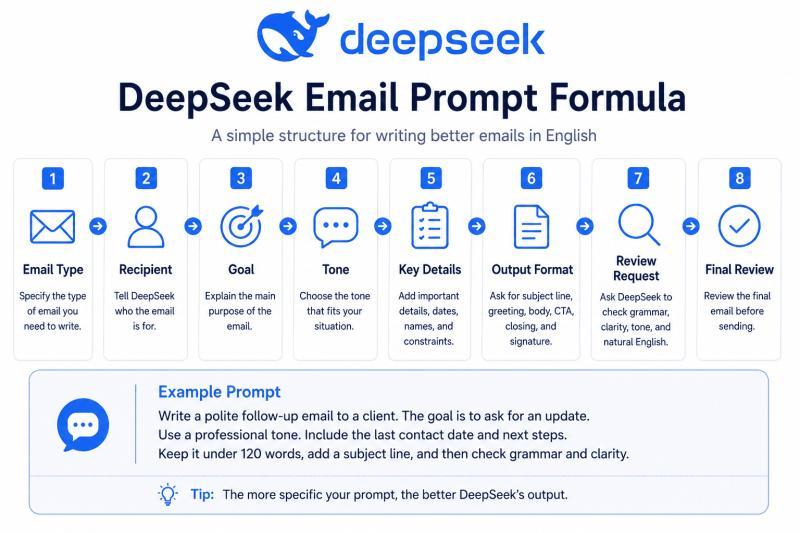
任务 Task + 背景 Context + 收件人 Recipient + 目标 Goal + 语气 Tone + 关键信息 Key Details + 输出格式 Output Format + 复查要求 Review Request
一个可复用的英文提示词模板是:
Write a [type of email] in English to [recipient]. The goal is [goal]. Use a [tone] tone. Include these details: [details]. Keep it under [word count] words. Structure it with a subject line, greeting, short body, clear call to action, and polite closing. After writing it, check grammar, clarity, tone, and whether it sounds natural.
每一部分的含义可以这样理解:
- Task(任务):说明邮件类型,如 follow-up、apology、client update、meeting request、job application 等
- Context(背景):简单交代发生了什么,AI 才知道前因后果
- Recipient(收件人):对方是谁?上级、客户、教授、同事、HR 还是陌生人
- Goal(目标):你希望对方做什么或知道什么
- Tone(语气):formal / friendly / polite / confident / warm / concise / professional 等
- Key details(关键信息):姓名、日期、项目、截止时间、问题、下一步等
- Output format(输出格式):要主题、称呼、正文、行动要求、结尾
- Review request(复查要求):让 AI 自查语法、语气、清晰度和自然程度
这个公式的“增量点”在于:你不是只给信息,而是顺便告诉 AI 你对写作质量的要求,让它按标准来写。
从目的到发送:一步步用 DeepSeek 写出一封好邮件
Step 1:先想清楚邮件目的
别急着打开 DeepSeek,先问自己一句:这封邮件发出去,我最希望对方做什么?
是要信息、要回复、要确认、要道歉,还是要推进项目?
比如:
I need to follow up with a client who has not replied to my proposal.
目的越清晰,后面所有内容就越好写。
Step 2:告诉 DeepSeek 收件人是谁
语气和用词,完全取决于你和对方的关系。你可以这样描述:
The recipient is a potential client. We had one meeting last week, but we do not know each other well.
给陌生客户写信,和给熟悉同事发邮件,语气完全不同。把关系说清楚,AI 才不会写得太亲密或太疏远。
Step 3:选对语气,而不是“随便写写”
语气是非母语写邮件最容易翻车的地方。你可以直接在提示词里要求:
Use a polite, professional, and friendly tone. Do not sound pushy.
也可以给更具体的指令:
Make it concise and confident.
Make it warm but still professional.
Make it formal but not too stiff.
说实话,我也不太确定每个人对“formal”的理解是不是一样,所以多试几个版本,对比一下最稳妥。
Step 4:把关键信息喂给 DeepSeek
AI 不会读心,它不知道你什么时候发了提案、项目什么时候开始、你哪天有空。你需要把必须出现的信息写进去:
Include that I sent the proposal on Monday, the project can start next week, and I am available for a 15-minute call on Thursday or Friday.
涉及隐私或机密内容时,用占位符代替:[Client Name]、[Project Name]、[Date] 等。
Step 5:让 DeepSeek 先给你一版草稿
当目的、对象、语气和细节都想好了,就可以发出完整提示词:
Write a professional follow-up email in English to a potential client. The goal is to ask if they had a chance to review my proposal. Use a polite and friendly tone. Mention that I sent the proposal on Monday and that I am available for a 15-minute call on Thursday or Friday. Keep it under 120 words. Include a subject line.
拿到第一版草稿后,不要急着复制粘贴,后面还有“打磨”环节。
Step 6:让 DeepSeek 帮你润色语法和表达
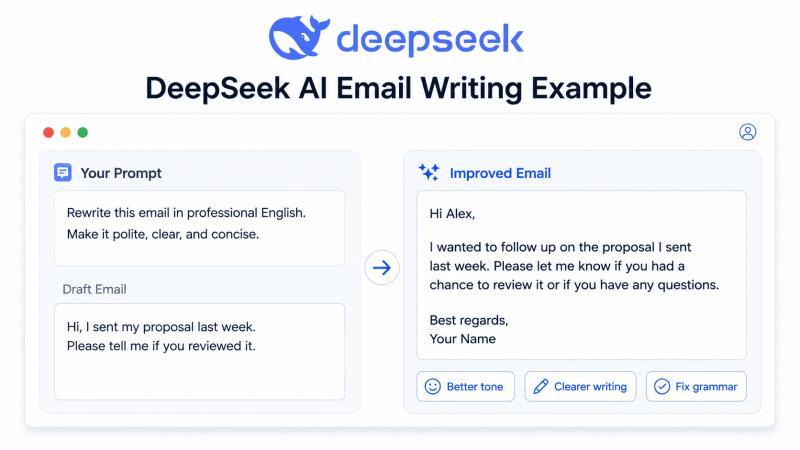
如果你已经有一封自己写的草稿,也可以直接让 DeepSeek 改写:
Improve this email for grammar, clarity, politeness, and natural business English. Keep the meaning the same and make it concise.
这一招对非母语写作者特别有用:保留你的意思,但让表达更像“老外日常写法”。
Step 7:不确定语气?要几个版本对比
有时候你会纠结:到底要正式一点,还是轻松一点?可以直接让 DeepSeek 给你多个版本:
Give me three versions of this email:
- Formal
- Friendly professional
- Short and direct
对比之后,你会更容易判断哪种语气适合当前场景。
Step 8:单独优化邮件主题
主题行决定对方会不会点开邮件。你可以这样提问:
Suggest five clear subject lines for this email. Make them professional and under 8 words.
比如:
- Follow-Up on Proposal
- Quick Question About Next Steps
- Checking In on Project Proposal
- Availability for a Short Call
- Proposal Review Follow-Up
Step 9:人工终审:改成“像你自己”的邮件
任何 AI 生成的邮件,都不要不看就发。你需要逐项检查:姓名、日期、金额、链接、附件、承诺的时间和条件等。
还要问自己一句:如果我是收件人,看完这封邮件,会不会觉得“这不像他平时说话的风格”?必要时,把一些句子改回更符合你个人表达习惯的版本。
实战示例:同一封邮件,用 DeepSeek 改写前后对比
示例 1:对方迟迟不回,你要跟进
原始版本(生硬):
Hi, I sent you proposal last week but you did not answer. Please tell me if you want it or not.
给 DeepSeek 的提示词:
Rewrite this email in natural professional English. Make it polite and friendly, not pushy. Add a clear subject line.
改写后邮件:
Subject: Follow-Up on Proposal
Hi [Name],
I hope you are doing well. I wanted to follow up on the proposal I sent last week and check whether you had a chance to review it.
Please let me know if you have any questions or if you would like to discuss the next steps.
Best regards, [Your Name]
为什么更好?
语气礼貌、不指责对方、给了对方“有问题可以问”的台阶,也明确提到“下一步”可以讨论什么,更容易收到回复。
示例 2:为延迟道歉
原始版本:
Sorry I am late. I was busy. I will send it tomorrow.
提示词:
Rewrite this as a professional apology email in English. Make it sincere, responsible, and concise.
改写后邮件:
Subject: Apology for the Delay
Hi [Name],
I apologize for the delay in sending this over. I had an unexpected schedule conflict, but I am finalizing it now and will send it by tomorrow.
Thank you for your patience and understanding.
Best regards, [Your Name]
亮点:
承担责任、不找借口,不过度解释,同时给出明确的新时间点,让对方心里有数。
示例 3:请求开会讨论项目
原始版本:
Can we meet? I want to talk about the project. Tell me when.
提示词:
Rewrite this as a polite business English email asking for a meeting. Include two possible time options and a clear call to action.
改写后邮件:
Subject: Meeting Request to Discuss the Project
Hi [Name],
I would like to schedule a short meeting to discuss the project and align on the next steps.
Would you be available on Tuesday at 10:00 AM or Wednesday at 2:00 PM? If neither time works for you, please feel free to suggest another time that is convenient.
Best regards, [Your Name]
亮点:
给出两个具体时间选项,同时保留对方选择空间,既高效又尊重对方时间安排。
示例 4:向客户汇报项目进度
原始版本:
We finished some things and still working on others. Maybe we finish next week. Need your feedback.
提示词:
Rewrite this as a professional client update email. Include progress, next steps, timeline, and a polite request for feedback.
改写后邮件:
Subject: Project Progress Update
Hi [Client Name],
I wanted to share a quick update on the project. We have completed the initial design review and are currently working on the final revisions.
We expect to complete the next version by the end of next week. To keep everything on track, could you please share your feedback on the current draft by [date]?
Best regards, [Your Name]
亮点:
信息有条理:已完成、进行中、预计时间、需要客户做什么,一目了然。
让 AI 写得更“像人”的小技巧
调整“机器人味”:让邮件更自然
很多 AI 邮件的问题不是错,而是“太对”:太正式、太模板化、太像系统通知。你可以用这些提示词来“去机器人味”:
Make this email sound natural but still professional.
Rewrite this email so it sounds less robotic and more human.
Make this email warmer, but keep it suitable for business.
Make this email shorter and more direct without sounding rude.
Avoid overly formal phrases like “I hope this email finds you well” unless they fit naturally.
Preserve my original meaning, but improve the grammar, flow, and tone.
Explain the changes you made so I can learn how to write better emails in English.
如果你想顺便提升自己的英文写作,可以这样要求:
Rewrite my email in natural professional English. Then explain the grammar, tone, and word choice changes in simple terms.
这样你不仅拿到一封更好的邮件,还能学到哪些表达更地道,下次自己写就更有感觉。
常见误区:这些用法会让 DeepSeek 变“鸡肋”
误区 1:提示词太模糊
Write an email.
这种指令几乎等于没说。更好的写法是:
Write a polite follow-up email to a potential client who has not replied to my proposal. Keep it under 120 words and include a clear subject line.
误区 2:不看就直接复制发送
AI 可能会:
- 用错称呼或性别
- 编造不准确的时间或细节
- 用在你公司文化里显得奇怪的表达
所以,任何 AI 生成的内容,都必须经过你自己这一关。
误区 3:语气用错对象
给老板写得像给朋友聊天,或者给客户写得太冷淡,都会影响合作氛围。拿不准时,可以让 DeepSeek 给你多个语气版本,对比选择。
误区 4:把机密信息全丢给 AI
不要在提示词里粘贴:
- 密码
- 客户隐私信息
- 公司机密数据
- 敏感法律或财务细节
- 身份证号、银行卡号等个人信息
可以用占位符代替:
[Client Name] [Company Name] [Project Details] [Amount] [Deadline]
误区 5:漏掉关键信息
发之前,至少检查:姓名、日期、金额、链接、附件、会议时间和截止日期。AI 不会替你确认这些真实数据。
误区 6:邮件太长、太乱
英国文化协会的邮件写作建议中提到:分段清晰、每段只讲一个重点的邮件,更容易被读完。你可以让 DeepSeek 帮你“瘦身”:
Shorten this email and organize it into clear paragraphs, without losing important information.
误区 7:使用不自然的“AI 口头禅”
有些 AI 爱用过于正式、重复的句式,比如每封邮件都以 “I hope this email finds you well” 开头。你可以明确要求它避免这些表达,或者只在合适场景使用。
隐私与准确性:用 DeepSeek 写邮件前要想清楚的事
DeepSeek 的隐私政策提到,它会收集用户提供的数据和部分自动收集的数据。所以,用它写邮件时,最好养成“只给必要信息、敏感内容用占位符”的习惯。
更安全的做法包括:
- 不粘贴密码
- 不粘贴客户隐私数据
- 不粘贴公司机密信息
- 不粘贴敏感法律或财务细节
- 不粘贴个人身份信息
- 用占位符替代姓名、金额、合同编号等
- 在发送前核对所有事实信息
比如,把:
Write an email to John Smith at ABC Company about the $45,000 contract delay.
改成:
Write an email to [Client Name] at [Company Name] about a contract delay. Use placeholders for the amount and deadline.
DeepSeek 可以帮你搞定措辞、语法、语气和结构,但对外发出的每一个字,责任都在你。尤其是金额、日期、承诺和附件,一定要自己再看一遍。
发送前的最后检查清单
在点击“Send”之前,可以用这份小清单快速过一遍:
- 主题是否清晰、具体?
- 前几句里,对方能不能看懂你写信的目的?
- 语气是否适合这个收件人?
- 内容是否足够简洁,没有废话?
- 你希望对方做什么,有没有写清楚?
- 姓名、日期、链接、金额、附件是否正确?
- 提示词里有没有暴露不该给 AI 的敏感信息?
- 整封邮件读起来,像不像你本人会说的话?
- 礼貌但不过分客套吗?
- 你有没有从头到尾自己再读一遍?
很多人以为“语法对了就是好邮件”,但真正有效的邮件,还要准确、合适、好执行。DeepSeek 能帮你走到 80 分,剩下的 20 分,需要你自己的判断和负责。
这套提示词和步骤,多用几次就会变成你的“肌肉记忆”。哪天临时要发一封重要英文邮件,翻出来照着用,会比临时问同事靠谱得多。
常见问题
Q:非英语母语,用 DeepSeek 写英文邮件真的靠谱吗?
A:整体来说是靠谱的,但前提是你给的信息足够清楚,并且愿意做最后的人工审核。DeepSeek 擅长的是语法、用词和语气优化,可以帮你把“能看懂的英文”变成“自然、专业的英文”。不过它不了解你公司内部规则,也可能误解具体场景,所以涉及金额、时间、承诺、合同等内容,一定要自己核对。建议的做法是:先自己用中文或简单英文写要点,再让 DeepSeek 改写和润色,而不是完全放手给它自由发挥。
Q:我英文很差,只能用中文描述,DeepSeek 还能帮我写邮件吗?
A:可以,只要你能用中文把目的、对象和关键信息说清楚。你可以用中文提示词,比如“帮我用英文写一封给客户的道歉邮件,语气要真诚、专业,包含这些信息:……”,DeepSeek 也能理解并输出英文邮件。关键在于:1)把时间、金额、姓名等信息写准确;2)告诉它你想要的语气和长度;3)生成后用翻译工具或请同事帮忙快速过一眼,确认没有明显误解。长期来看,你也可以让它顺便解释用词,顺带提升自己的英文水平。
Q:怎么判断一封 DeepSeek 写的邮件语气是否“过头”了?
A:可以从三个维度快速判断:称呼是否合适、客套话是否太多、请求是否太强硬或太软。比如给同事写邮件却用 “Dear Sir or Madam”,就太正式;整封邮件三分之一都是寒暄,也会显得拖沓;请求对方做事时,如果只说 “It would be great if…”,可能不够明确。建议你:1)让 DeepSeek 生成两个版本,一个 formal,一个 friendly professional;2)大声读一遍,看听起来像不像你们公司真实会用的语气;3)必要时,把过于华丽的句子改成简单短句。
Q:用 DeepSeek 写工作邮件,会不会有泄密风险?
A:有一定风险,所以要养成“最小必要信息”原则。DeepSeek 的隐私政策说明会收集部分用户数据,因此不建议直接粘贴合同全文、客户名单、财务报表等敏感内容。更安全的做法是:1)用占位符代替姓名、金额、公司名等;2)只描述必要背景,不给出具体账号、编号等;3)生成邮件后,再在本地邮件客户端里手动补上真实数据。这样既能利用 AI 的语言能力,又能把风险控制在可接受范围内。
Q:有没有一条万能提示词,可以应付大部分英文邮件场景?
A:可以有一条“八成通用”的模板,但你每次还是要填入自己的具体信息。比如:
Write a [type of email] in English to [recipient]. The goal is [goal]. Use a [tone] tone. Include these details: [details]. Keep it under [word count] words and include a subject line.
你只需要把 type、recipient、goal、tone、details、word count 换成自己的内容,就能快速生成比较靠谱的初稿。提醒一点:哪怕模板再好,也不要跳过最后的人工检查,这一步决定了邮件是不是“真的能发出去”。
写邮件这件事,越往后越考验细节和耐心。DeepSeek 可以帮你省下大量“纠结英文怎么说”的时间,但方向和底线,还是要由你来定。