将其制作成技能
将重复步骤编码为验证循环的最常见方法是将其写成一个技能。创建技能最快的方式是安装skill-creator插件,让Claude通过访谈了解你的工作流程:
示例:
/skill-creator Create a skill for verifying frontend changes end-to-end. Interview me about my workflow.
你也可以手动编写技能,只需在项目的.claude/skills/目录下放置一个markdown文件。最简单的验证技能示例如下:
# .claude/skills/verify-log-hygiene/SKILL.md
---
name: verify-log-hygiene
description: Check that error logs include the request ID and never
  include the request body. Use when the diff touches error handling
  or logging.
allowed-tools: [Read, Edit, Grep]
---
Read the error-handling paths in the current diff.

For each log call on an error path, confirm it includes the request ID
and does not pass the request body, headers, or any user-supplied payload.

Report each violation with file:line, then fix it: add the request ID
where it's missing and strip the payload from the log call.
完整的技能架构和设计理念详见我们的构建技能完整指南。
匹配验证检查的运行方式
接下来需要确定验证循环的触发方式:独立调用、嵌入式、链式调用或绑定到PR。
独立调用
你在产物生成后主动调用。独立技能适合跨多个工作流但不需要每次都执行的检查,比如提交前的安全扫描、PR前的无障碍审核、整个仓库的许可证头验证等。缺点是每次调用都需要你主动执行。当你发现每次改动都要执行时,说明应该将其嵌入或链式调用。
嵌入式调用
作为生成技能的一部分自动触发。该检查属于特定工作流,工作流运行时自动执行。最简单的方式是在生成技能的主体末尾添加一行调用验证步骤。
示例:
# .claude/skills/scaffold-component/SKILL.md
---
name: scaffold-component
description: Scaffold a new React component under src/components/, including the component file, its co-located test, and an index export. Use when the user asks to create a new component.
allowed-tools: [Read, Write, Edit, Bash, Glob]
---

# Scaffold a new React component

Given a component name (PascalCase), create the following under `src/components//`:

1. `.tsx`: function component with a typed props interface and a default export.
2. `.test.tsx`: React Testing Library test that renders the component and asserts it mounts without throwing.
3. `index.ts`: re-export the default and any named exports.

Follow the patterns in `src/components/Button/` as the reference. Match the import alias style (`@/components/...`) used throughout the codebase.

# code continues...

After creating the component file, run eslint on it and
address any errors before reporting completion.
验证嵌入是否生效,可以在新任务上调用该技能,确认新步骤作为输出的一部分运行。如果没有,说明技能描述或之前的指令未包含该验证步骤。
嵌入式只适用于你能编辑的技能:自己写的或项目级安装的技能(SKILL.md文件可控)。内置技能和插件管理的技能(更新时会被覆盖)不适合嵌入,建议用链式调用。
跨工作流的检查应使用独立调用,方便在任何上下文中调用。
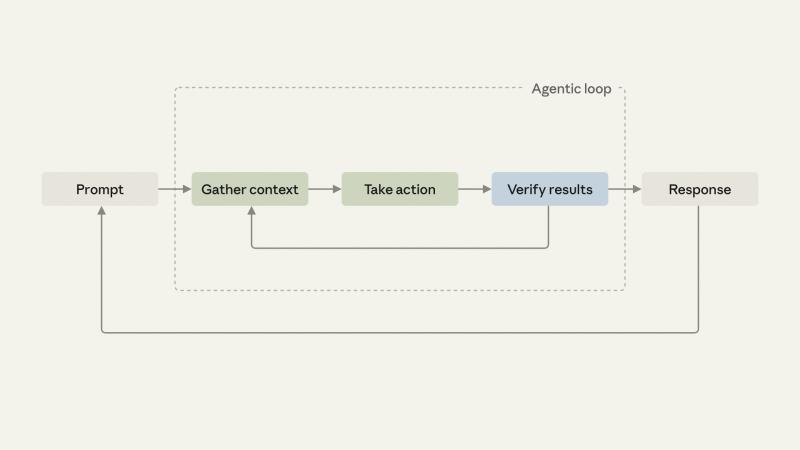
链式调用
一个技能结束时调用另一个技能,多个验证步骤串联形成端到端流程。
Anthropic的Claude Code团队日常使用此模式:/code-review查找bug,/simplify清理diff,/verify确认端到端行为,UI变更时自定义/design技能检查设计规范。
链式调用也适合无法修改的技能:创建一个自定义包装技能,先调用原始技能,再调用验证技能,如下示例:
# .claude/skills/safe-refactor/SKILL.md
Run /simplify on the current diff first.
When /simplify finishes, invoke /verify-no-public-api-changes.
从习惯(“我总是在/simplify后运行/verify”)变成约定(“/simplify完成后总运行/verify”),链式调用自动完成整个开发流程,只有出现问题时才需要人工介入。
如果步骤相对独立,有时只想运行其中一个,可以跳过链式调用。链式调用自动化强,但灵活性较低,且可能增加token消耗,建议先测试再广泛部署。
每个PR都运行
当链式调用稳定后,可以在每个PR上运行相同流程。无论提交者是否主动调用,变更都会通过相同的验证门槛。这种基础设施从个人工具升级为团队基础设施,节省的是整个团队的时间。
在链条还在调整阶段时,建议暂缓PR级别的强制门槛,因为每次调整都会影响全员。
扩展你的验证循环工程
验证循环的创建流程一致,无论自动化内容或环境如何:
- 选择本周最常做的手动后续操作。
- 先尝试内置的
/verify技能,看是否有帮助。 - 用简单英文写出流程,像给新同事第一天交接一样。
- 交给skill-creator,或自己放入
.claude/skills/目录。 - 在新任务上调用,确认验证步骤运行,必要时迭代。
- 试验技能链,打造端到端验证流程。
你编码给Claude遵循的内容越多,Claude首次响应越接近预期。省下的调整时间可以专注于只有你能完成的独特工作。
开始使用Claude Code中的验证循环:Claude Code产品页
本文作者为Claude Code团队成员Delba de Oliviera。